LASS - Scratch Monitor

發想:
台灣國中小的程式教育中,使用的程式語言最多的大概就是MIT的Scratch,因此利用Scratch語言來完成LASS的應用,可以對提供程式及環境教育的一個幫助。
Code
LASS Scratch Monitor的構想:
- CLIENT端,使用Scratch擴充積木。
- 指定某一設備的積木
- 顯示設備名稱的積木
- 顯示PM2.5的積木
- 顯示溫度的積木
- 顯示濕度的積木
- SERVER端,使用Python建立http server,回應Scratch的指令。
- 讀取Scratch的指令。
- 指定擷取JSON的設備名稱。
- http get讀取LASS JSON 資料。
- JSON資料的解析。
- 回傳Scratch LASS 設備、PM2.5、溫度、濕度資料。
LASS Scratch Monitor的實作:
- CLIENT端,建立Scratch擴充積木。
- Scratch的擴充積木,可以使用JSON格式來指定。
- MIT Scratch 官網對擴充積木的說明。
- MIT Scratch 官網擴充積木指令說明。
- 感謝張文宏老師對擴充積木的研究。
- 完成LASS Monitor JSON格式,檔案命名為lass.s2e
- {
- "extensionName": " LASS ", 擴充積木的名稱
- "extensionPort": 50099, 擴充積木與Python的通訊PORT
- "blockSpecs": [
- [" ", "LASS Device ID:%s","lass","FT1_001"], 指定LASS設備名稱的積木
- ["r", "DEVICE", "device"], 顯示LASS設備名稱的積木
- ["r", "PM2.5", "pm"], 顯示PM2.5的積木
- ["r", "溫度", "temp"], 顯示溫度的積木
- ["r", "濕度", "hum"], 顯示濕度的積木
- ]
- }
- 匯入Scratch 2.0離線版
- 開啟Scratch2.0離線版後,按住SHIFT鍵點選檔案功能表中,匯入實驗性http擴充功能。
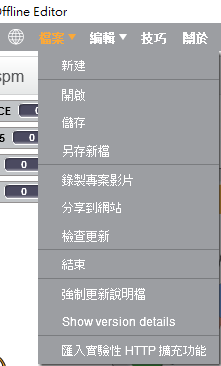
- 選取lass.s2e檔案。
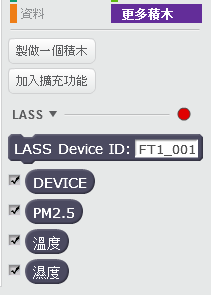
- 擴充積木可以在更多積木中顯示
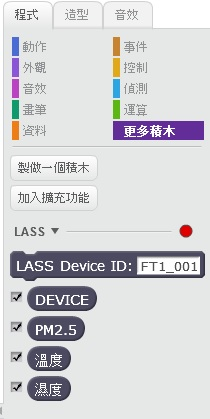
- Server端,Python Http Server的建立:
- 安裝Python 3.5
- Server 端程式碼lass.py:
- #! /usr/bin/env python3
- from http.server import BaseHTTPRequestHandler
- from http.server import HTTPServer
- import os, sys, urllib
- import requests
- import json
- ###### 全域變數建議區 (放此處較易理解) #####
- ####################################################
- HELPER_NAME = "基本的Helper"
- HELPER_PORT = 50099
- #L設備名稱
- my_device = "none"
- ####################################################
- #接收Scratch指令
- class CmdHandler(BaseHTTPRequestHandler):
- """
- This class handles HTTP GET requests sent from Scratch2.
- """
- def do_GET(self):
- """
- process HTTP GET requests
- """
- # skip over the first / . example: /poll -> poll
- cmd = self.path[1:]
- # create a command list .
- cmd_list = cmd.split('/',1)
- s = "不回傳資料"
- global my_device
- ###### 處理Scratch送出的命令
- ###### 若需回應Scratch的Poll命令,再把文字存在變數s ##
- ##############################################################
- #指定LASS設備名稱
- if cmd_list[0] == "lass" :
- my_device = "http://nrl.iis.sinica.edu.tw/LASS/last.php?device_id=" + cmd_list[1]
- #print(my_device)
- #Scratch送出poll指令時回傳PM2.5、溫度、濕度資料
- if (cmd_list[0] == "poll") and ( my_device != "none"):
- with urllib.request.urlopen(my_device) as response:
- s = response.read()
- j = json.loads(s.decode('utf-8'))
- s = "device " + str(j['device_id']) + "\r\n"
- s += "pm " + str(j['s_d0']) + "\r\n"
- s += "temp " + str(j['s_t0']) + "\r\n"
- s += "hum " + str(j['s_h0']) + "\r\n"
- #print (s)
- if cmd_list[0] != "poll" :
- print(cmd_list[0])
- #############################################################
- self.send_resp(s)
- #http GET回傳Scratch資料
- def send_resp(self, response):
- """
- This method sends Scratch an HTTP response to an HTTP GET command.
- """
- crlf = "\r\n"
- http_response = "HTTP/1.1 200 OK" + crlf
- http_response += "Content-Type: text/html; charset=ISO-8859-1" + crlf
- http_response += "Content-Length" + str(len(response)) + crlf
- http_response += "Access-Control-Allow-Origin: *" + crlf
- http_response += crlf
- if response != '不回傳資料':
- http_response += str(response) + crlf
- #print(http_response)
- # send it out the door to Scratch
- self.wfile.write(http_response.encode('utf-8'))
- #設定SERVER功能
- def start_server():
- """
- This function populates class variables with essential data and
- instantiates the HTTP Server
- """
- try:
- server = HTTPServer(('localhost', HELPER_PORT ), CmdHandler)
- print ('啟動<' + HELPER_NAME + '>伺服程式!(port ' + str(HELPER_PORT) + ')')
- print ('要退出請按 <Ctrl-C> \n')
- print ('請執行Scrath2(記得要開啟對應的s2e檔案!)')
- except Exception:
- print ('HTTP Socket may already be in use - restart Scratch')
- raise
- try:
- global my_device
- my_device = "none"
- #start the server
- server.serve_forever()
- except KeyboardInterrupt:
- print ('\n\n退出程式……\n')
- sys.exit()
- if __name__ == "__main__":
- start_server()
- 使用python 執行lass.py
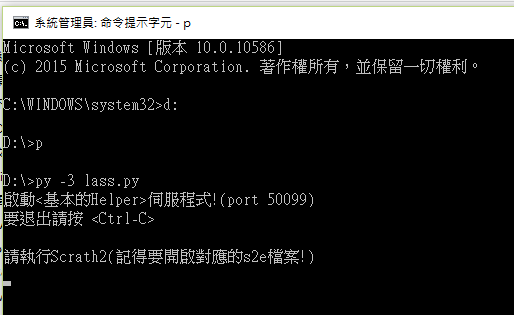
- 使用擴充積木撰寫Scratch Monitor 程式
- 設定貓咪色的程式碼

- 新增PM2.5儀表角色的程式碼
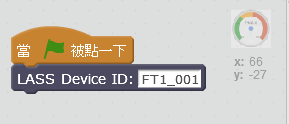
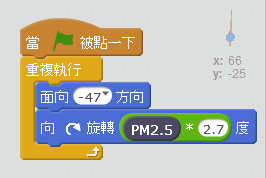
- 新增指針角色的程式碼
- 勾選更多積木中的LASS感測數值
- 點選旗子執行LASS JSON資料擷取